Switch on Sentry
Switch on the Sentry breaker, or the remote switch of the DC-DC converter. Sentry has no on/off switch of its own. It needs up to 3 minutes to start.
Make sure your PC, tablet or phone is on the same network as Sentry.
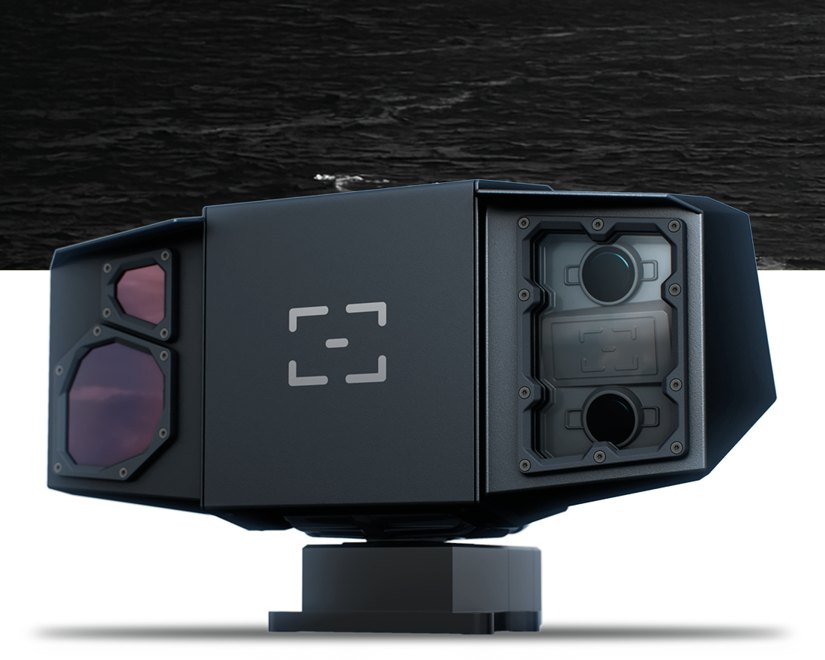
Sentry turns 360° and watches the water day and night. Two thermal cameras and two color cameras, wide and narrow. Its AI detects, classifies and tracks boats, buoys and people in the water. It warns you before they become a danger.
Go through the 9 steps with Next. The app shows what you see on your device.
Switch on the Sentry breaker, or the remote switch of the DC-DC converter. Sentry has no on/off switch of its own. It needs up to 3 minutes to start.
Make sure your PC, tablet or phone is on the same network as Sentry.
http://sentry.local/Download the PC apphttp://sentry.local/With a fixed IP address: http://192.168.1.191/The first screen is Register to SEA.AI. Scan the QR code, or select Go To Registration.
Registration is required before the first use. It gives you software updates. You get a Product Key by e-mail.
Register at connect.sea.aiOn a PC or tablet. Scan the QR code with your phone, or select Go To Registration.
Select Insert Product Key. Type the 6-character key from the e-mail. Select Validate.
Read the Terms of Use – SEA.AI Connect. Select Agree & Continue. The app asks only once.
You see the live image with the detections. The bar at the top shows the alarm state. The menu is on the right.
On a PC, tablet or MFD: the alarm bar is at the top.
Select the mode button. Underway: Collision Avoidance. At anchor or in port: Surveillance. To steer the camera yourself: Camera Control.
On a PC, tablet or MFD: the mode button is on the right.
When an object becomes dangerous, its box turns red and the alarm sounds. The bar at the top names the type, the direction and the distance.
Look in the direction of the alarm. Keep a proper lookout.
Tap the speaker to mute the alarm sound. Tap it again to switch the sound back on. The visual alarm stays on.
Next: try every button yourself in Try the app, or read about modes and alarms.
On a PC, tablet or MFD: Mute is on the left.
Step 1 of 9