Choose your display. The drawing shows the network you need.
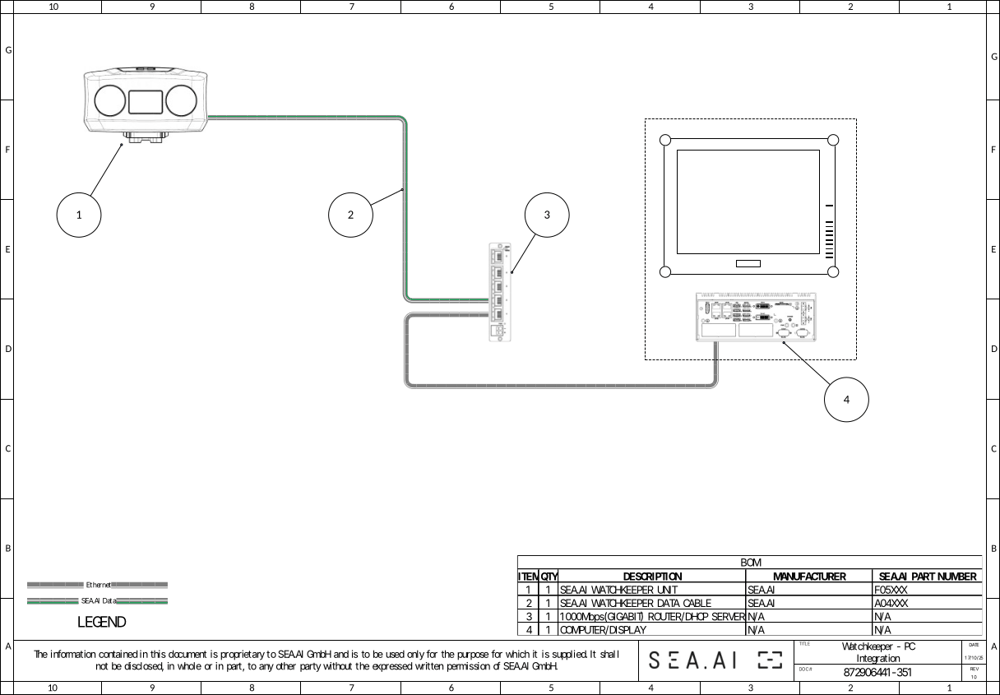
CautionWhen an MFD manages the network, switch off DHCP on any extra router.
Watchkeeper on an MFD
There are three ways to see Watchkeeper on an MFD. Only the SEA.AI app gives you all functions.
Full appSEA.AI app on the MFDThe complete app: live image, detections, alarms, all views, Settings and AI Feedback. Recommended.
Video onlyVideo stream (RTSP)The camera image with detection boxes on the camera page of the MFD. For settings and the other functions, use the SEA.AI app on a phone, tablet or PC.
Full appMini PC on HDMIA mini PC runs the SEA.AI app. The MFD shows it on its HDMI input (monitor mode).
MFD compatibility list
| Model | SEA.AI app | Video (RTSP) | Mini PC (HDMI) | Alarm |
|---|---|---|---|---|
| Raymarine | ||||
| Axiom+ | ✓ | – | – | MFD alarm |
| Axiom Pro | ✓ | – | – | MFD alarm |
| Axiom 2 Pro | ✓ | – | – | MFD alarm |
| Axiom XL | ✓ | – | ✓ | MFD alarm |
| Axiom 2 XL | ✓ | – | ✓ | MFD alarm |
| Garmin | ||||
| GPSMAP 9xxx | ✓ | – | ✓ | NMEA buzzer |
| GPSMAP 84xx | ✓ | – | ✓ | NMEA buzzer |
| Navico (B&G, Lowrance, Simrad) | ||||
| Zeus 3S | – | ✓ | – | MFD alarm |
| NSS evo3S | – | ✓ | – | MFD alarm |
| NSO evo3S | – | ✓ | ✓ | MFD alarm |
| NSX | ✓ | – | – | MFD alarm |
| Zeus S | ✓ | – | – | MFD alarm |
| Zeus SR | ✓ | – | – | MFD alarm |
| Furuno | ||||
| TZT 16F | – | ✓1 | ✓ | NMEA buzzer |
| TZT 19F | – | ✓1 | ✓ | NMEA buzzer |
| TZT 2BB | – | ✓1 | ✓ | NMEA buzzer |
| TZT 16/22/24X | – | ✓1 | ✓ | NMEA buzzer |
| TZT BBX | – | ✓1 | ✓ | NMEA buzzer |
1 Lower frame rate or resolution. ✓ supported · – not supported. MFD alarm: the MFD sounds the alarm. NMEA buzzer: needs an NMEA 2000 buzzer and an NMEA 2000 gateway (see below). Status September 2025.
Details and the latest list: sea.ai MFD compatibility.
Video on an MFD (RTSP)
Add a network camera on the MFD. Color: rtsp://{IP}:8555/rgb1. Thermal: rtsp://{IP}:8555/t1. The full URLs are in Settings › Setup.
NMEA 2000
A gateway gives boat data and drives buzzers. Watchkeeper detects without it. Supported: ShipModul MiniPlex-3E-N2K (F07503).
- Settings › Setup › NMEA Setup. Model: ShipModul.
- Enter IP (for example
192.168.1.6) and port (for example10110). - Select Check Connection.